Penguin Party
It’s early April in 2026. It has been almost a year since my last post went live.
If you’ve been following along and connecting the dots, you can probably guess the trajectory. In December 2024, I was informed my role was being made redundant. By January 2025, I had finished my notice period, and by February, I was officially down the rabbit hole of establishing my own business.
I’ll be the first to admit I underestimated the journey. Back in early February, I was focused on the tech stack - after all, without a solid platform and a professional email, you don't really have a business - at least in my industry segment. But the first real reality check was the insurance. It took months.
To keep it brief, here are the basics:
- No insurance, no work. In this industry, it’s a non-negotiable.
- Gatekeeping. Without high-level coverage, you can’t even look at large enterprise or government contracts.
- Scope creep. The cover I needed pushed me into "medium business" territory, bringing a whole new level of policy complexity with it.
Fast forward to late March: I had two clients lined up and insurance was finally sorted. Then boom. The "Liberation Day" tariffs hit.
I’m not directly exposed to US markets, and neither are my clients. However, everyone is exposed to "the market" at large. Both clients informed me that finance had frozen all discretionary spending until further notice. That "hangover" lasted until late August.
So, here we are. I’ve been working around the clock since September, and I finally have a moment to breathe. All of that is a long-winded way of saying two things:
- This is why I’ve been gone.
- I started this business talking about Linux, and I’m ready to pick that thread back up.
Penguin curious
I'm no stranger to Linux as a desktop OS. I actually first dabbled with it back in the Windows Vista era, when Windows was an unstable buggy mess and I just wanted something that worked. Since then I have always had some Linux machine around. If I need to do serious work and don't specifically need a Windows app I'll usually reach for my Linux machine.
Back to the business, I chose Linux, at the time citing things like Ads, Lock-in, Privacy and Security.
Now I work in the Security industry so maybe I'm a little more concerned, but I want you to think about this for a moment....
If you’ve recently walked into an Officeworks store or hopped online to buy a new business laptop, you’ve likely seen the "Windows 11 Pro" sticker. For most small business owners, "Pro" sounds like the finish line. It implies you’ve graduated from the "Home" version and now have the tools required to run a serious operation. In fairness, Windows 11 Pro does include some essential security features, like BitLocker encryption, device management features, etc.. Unless you're in the IT industry you're unlikely to be aware of the hidden catch that Microsoft doesn't advertise: Windows 11 Pro still treats your business computer a like a consumer device.
With my security hat on, the "Pro" edition sits in a frustrating middle ground. It gives you more control than a home user, but it doesn't give you total control. And you don't have to be in my industry to care. Anyone who handles sensitive client data, medical records, proprietary designs, etc.. this lack of control is a significant "blind spot" in your security posture.
Not so Pro?
 If you want actual protections for your business, you don't want to be a "Professional" you want to be an "Enterprise".
Let's unpack the difference between the Enterprise and Professional versions, and to do this, we first need to talk about telemetry.
If you want actual protections for your business, you don't want to be a "Professional" you want to be an "Enterprise".
Let's unpack the difference between the Enterprise and Professional versions, and to do this, we first need to talk about telemetry.
Telemetry is the "silent conversation" your computer has with Microsoft’s servers in the background - without your knowledge - without your consent (well, buried 50 pages deep in the EULA "consent"). By default, Windows sends back data about how you use the system, which apps you open, and how your hardware is performing. Microsoft uses this to improve their software, but for a privacy-conscious business, this constant data stream is a concern.
In Windows 11, there are different "levels" of this data sharing:
- Required (Basic): Microsoft's "bare minimum" needed to keep the device secure and up to date.
- Optional (Full): Detailed info about websites you browse, how you use features, and enhanced error reporting.
The problem is that Windows 11 Pro lets you dial the level down to "Required" but you can't switch it off. Your device keeps phoning home.
If your business seeks to follow strict privacy requirements then the goal is zero telemetry. Only Windows 11 Enterprise allows an administrator to set the diagnostic data level to "Security," which effectively shuts the door on non-essential data sharing.
Crushing Candy
Have you ever noticed "suggested apps" like Candy Crush or TikTok appearing in the Start menu of a brand-new work computer? Or perhaps you've seen "tips and tricks" pop up in your taskbar that look suspiciously like advertisements for other Microsoft products?
There's a whole other rant I can go on about advertising inside operating systems and ownership - but the simple fact is this. If you are running Windows 11 Pro, Microsoft assumes you might still want (yes, the word want is doing a lot of heavy lifting) these "suggestions." While you can manually unpin them, a Pro license doesn't allow a business owner to centrally "turn off" these invasive features across the entire company via a single setting.
On the other hand, Windows 11 Enterprise is built for an environment where focus and privacy are paramount. It allows an admin to:
- Completely disable the "Microsoft Consumer Experience."
- Prevent "suggested" apps from ever being installed.
- Remove the "fun facts" and ads that occasionally appear on the Windows lock screen.
If you're a business trying to maintain a clean, professional, and distraction-free digital environment, these aren't just "nice-to-haves" - they are essential for maintaining the integrity of your workspace.
Not an Enterprise
The problem is that at the time I'm writing this, Windows Enterprise editions are locked behind a Microsoft 365 subscription. So you're either "all in" on Microsoft's platform or you have to pay an additional tax on top of your existing productivity solution.
For my business, this gate keeping made Windows a non-starter. But what about at home?
Broken Windows
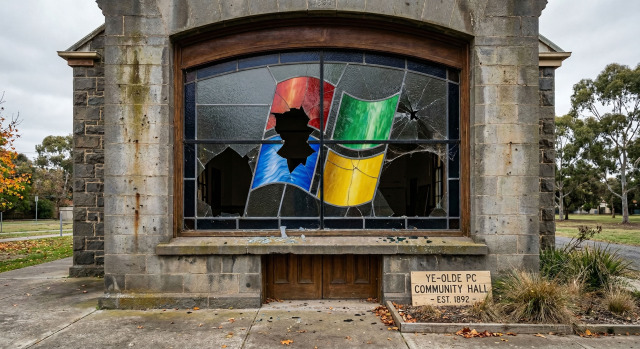 Yet again, I'm going to set a scene... My kids love playing games as a family - who doesn't. It started as Minecraft becoming a pandemic staple, but over time has grown to more complex games. I'm not a fan of brain-rotting games (hello Roblox!) so we've steered the kids towards Satisfactory, a factory building and automation game available on Steam. There's something satisfying (pun not intended) in steering my kids towards a game that requires a spreadsheet (or at least a pen and paper) to play properly.
After a recent Windows 11 update the game broke. The kids would ask to jump on together and I just couldn't. My experience was constant startup crashes. I tried the usual tricks:
- Driver and firmware updates.
- Ensuring my steam data files weren't corrupted.
- Reboots
Eventually I started an online search and that's where I found some answers. It's a bug introduced by recent Windows 11 updates - yay!
I cracked the shits and decided I would nuke Windows and replace it with Bazzite. After a crash-free round of Satisfactory on my now Linux-powered laptop, it dawned on me - I have almost entirely removed Windows from my life.
Leaving behind the broken shards
If all the various computers I own were to be laid out on a desk, I could end up accidentally starting a medium sized business. That's to say I'm a bit of a tech hoarder with lots of equipment floating around.
That's what made this realisation really striking. I have a lot of "Main machines" and all but 1 now run Linux.
- Framework 16 - Linux
- Framework 13 (Personal) - Linux
- Framework 13 (Business) - Linux
- Steam Deck - Linux (or course)
- Ayaneo 2 - Linux
- Countless various old Dell, HP and Lenovo laptops - Linux, Linux, Linux
- The Living room "TV PC" - Linux
The only machine not running Linux is my primary desktop as it's the last place I run a few Windows specific bits of software and use it to play Minecraft with the kids. But truth be told due to all the great Linux PCs I have, I don't use my desktop all that much.
I have consolidated down to 2 main Linux distributions and some random "others":
- If it's something I use for "serious work" it runs Linux Mint. It's just rock solid and stable. Both Framework 13s fall into this category.
- If it's something that plays games it runs Bazzite. The Framework 16, Ayaneo 2 and TV PC all fall into this category.
- The first "other" is the Steam Deck running Steam OS.
- The final "other" is the various old laptops, they run a mix of whatever distribution I happen to be playing with at any given time. Right now that means I have some running CachyOS, Fedora and various others.
The first time I left Windows was during the Vista era. It wasn't a permanent exodus as I was willing to forgive Microsoft when they "made good" on their failures with the likes of Windows 7.
Microsoft's current direction feels like an erosion of trust, an erosion of ownership and it doesn't feel like a course correction is coming any time soon. Last time I made this transition I had to largely give up PC gaming, this time I don't even have to do that. I've only got one Window left to break and I don't see it lasting long.